How to Play Krillion Unlimited: Rules & Controls
Your first expedition
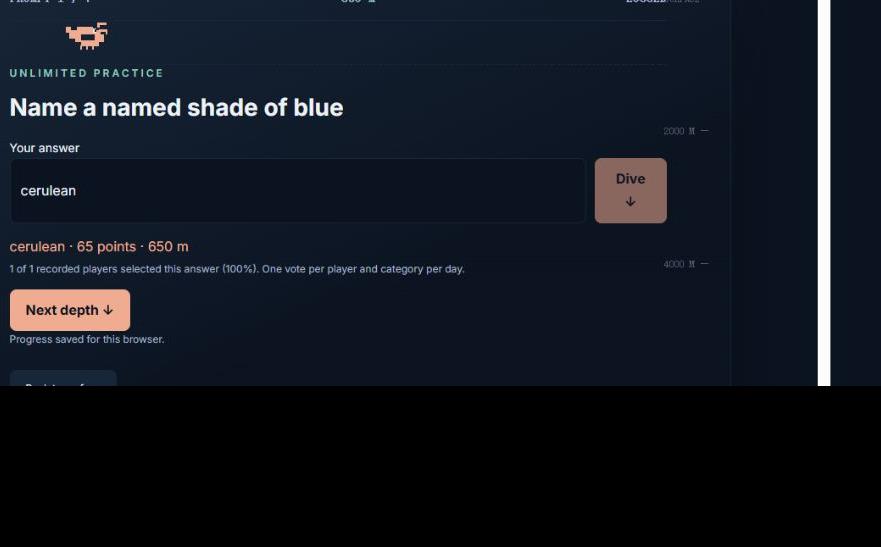
Krillion Unlimited asks you to name one thing that fits a category. Choose a mode on the homepage and press Play. You will see a loading animation in the same ocean panel, followed by the first of seven prompts. You have 25 seconds per prompt. Type your answer and press Enter or tap Dive. A successful response locks that prompt and shows its editorial points. Next depth starts the following prompt.
Read the category literally. “Name a marine mammal” requires an animal that is both marine and a mammal. A shark belongs in the ocean but does not satisfy that category. “Name a moon in our solar system” is a different request from naming a planet. The accepted bank is finite; a response can be valid in the world yet absent from this edition.
Keyboard and touch controls
On desktop, the answer field receives focus when a new prompt begins. Type a response and use Enter to submit. On touchscreens, tap the field to bring up the keyboard and use the Dive button. You do not need to drag the shrimp or aim at anything. The shrimp's position represents accumulated points, and movement is automatic.
The Skip prompt button records zero and reveals the next-step control. A timer reaching zero does the same. Invalid submissions leave the timer running and allow another attempt. There is no penalty beyond elapsed time for trying an unlisted word. Once an answer is accepted, you cannot replace it with a higher-scoring one in that prompt.
What happens between prompts?
The result panel gives the accepted spelling and points. When available, it also reports actual selections recorded by other players in the same category and daily pool. That display is separate from your fixed depth score. You control when the next prompt starts, so there is no countdown while you read a revealed result.
Seven completed prompts produce an expedition report. Each point equals ten metres, and the maximum is 700 points or 7,000 metres. The report lists all seven categories, your accepted responses and their individual scores. A timeout or skipped prompt appears explicitly instead of silently disappearing.
Modes, retries and saved games
Unlimited practice draws seven categories from a 21-category bank. A new run reshuffles them. There is no daily play cap, but the bank is finite and categories recur. Daily challenge uses the UTC date to choose a shared set. It keeps your completed run for that date and submits a casual daily leaderboard score when the service is available.
Back to surface returns to the cover without erasing your current run. Select the same mode to resume it. An active countdown still follows real elapsed time, including time spent away from the page. Reloading does not provide a fresh 25 seconds. Switching to practice does not replace the daily save, because the two modes use separate slots.
If something does not work
A loading failure offers Retry loading game. Check your connection, then retry. Once the bank is loaded, temporary player-service errors do not stop local gameplay. A save warning explains when only the local copy is available. Use the same browser and avoid clearing site data if you want to keep that copy.
Fullscreen depends on browser support and device settings. If it is unavailable, play in the normal responsive panel. You can report a missing answer through the discussion or contact page; include the exact category and spelling. Learn how points work in the scoring guide, or return to play Krillion Unlimited.
Example: correct an input before committing
Imagine the prompt is “Name a marine mammal.” Typing “shark” does not match this category. While time remains, replace it with “narwhal” and press Dive or Enter. This edition accepts narwhal for 65 points, adding 650 metres. The timer stops for that prompt, and Next depth begins the next question. This is a worked example, not a claim about your current daily selection.
The sequence is read category → type → submit → check result → Next depth. An unlisted input leaves the same question open; an accepted input cannot be upgraded afterward. Consult the category directory if you want to study the accepted examples after your run.